
Plan The Room. Run The Program. Keep The Record.
Current, with advanced capture in Beta
Run the room from the same record that sold the room.
Coordinate the event, venue, people, production calendar, technical plan, run of show, crew, safety, capture, and post event handoff without separating the live day from everything that prepared it.
Book it. Build it. Sell it. Run it. Capture it. Share it.
The Problem It Solves
The event record should not disappear between systems.
Live Event Production Hub
The performance is often treated as one block on a calendar. The actual show lives in a rider, six spreadsheets, a stage plot PDF, a text thread, a paper call sheet, and the stage manager’s marked script. When the show changes, the room learns about it at different times.
Complete Workflow
Move from source to approved outcome.
Live Event Production Hub
- Create the event and confirm venue, participants, dates, access, rights, and responsibilities.
- Build the production calendar and department worksheets.
- Configure the stage, audio, lighting, projection, power, hospitality, safety, and house plan.
- Assign the crew and publish role specific calls.
- Build and call the run of show.
- Capture, caption, stream, hand off, strike, settle, and archive the approved record.
What The User Gets
Useful work, visible responsibility, and a record worth keeping.
User outcomes
- One current plan for the stage manager, technical director, house, crew, artist, and operator.
- Fewer stale PDFs and fewer day of surprises.
- Department work connected to the actual sequence of the show.
- A production archive that can support the next performance, tour, report, or campaign.
Examples and samples
- A theater builds rehearsals, technical calls, department worksheets, cueing, capture, and post show reports.
- A venue advances a touring artist, updates the stage plot, assigns crew, runs doors, and closes the night.
- A festival coordinates stages, vendors, volunteers, sponsors, ticketing, safety, and settlement.
- A school or community program records the event and preserves captions, media, credits, and approvals.
Visual Workflow
Live Event Production Hub from source to approved outcome.
Follow the practical movement of the work. The machine organizes, drafts, compares, and prepares. The responsible person keeps authority over approval and release.

Evidence And Boundaries
Show what is current. Name what still requires people, providers, or a managed scope.
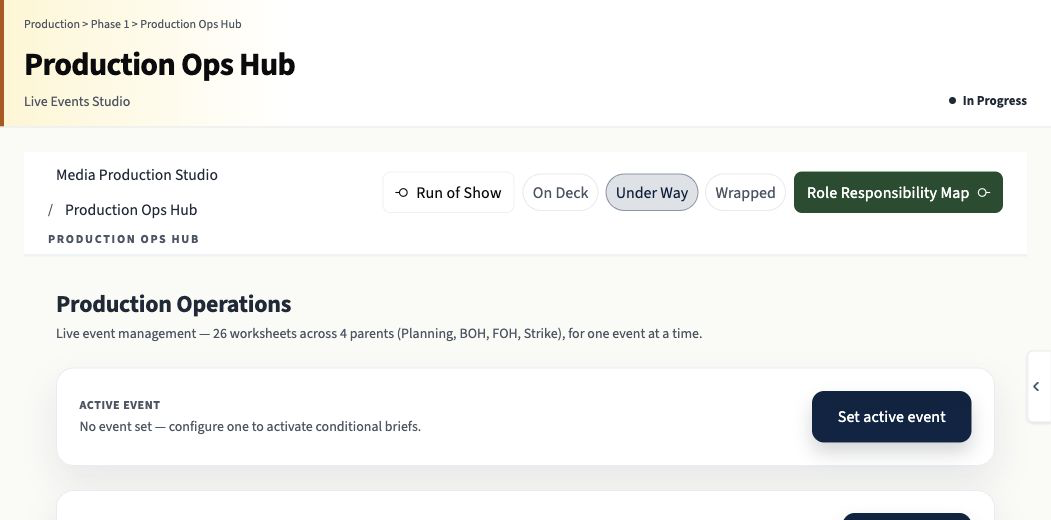
- Current surfaces include event records, production calendar, venue and artist profiles, Production Ops Hub, 26 department worksheets plus the hub, stage plot tools, Run of Show, Crew Portal, safety, and day of controls.
- Capture, caption, stream, device, and provider dependent functions carry separate Beta or Partial labels.
- Human operators remain responsible for safety, cue calling, staffing, release, and final delivery.
Connected product areas
Read. Compare. Decide.
The website should do the explaining.
Review the actual application surface, the complete workflow, the practical outcomes, and the maturity boundary. Then open the application, browse the catalog, or request a written scope.
Book it. Build it. Sell it. Run it. Capture it. Share it.
