Learn / The IMC Machine
How To Work The Evidence Orchestrator
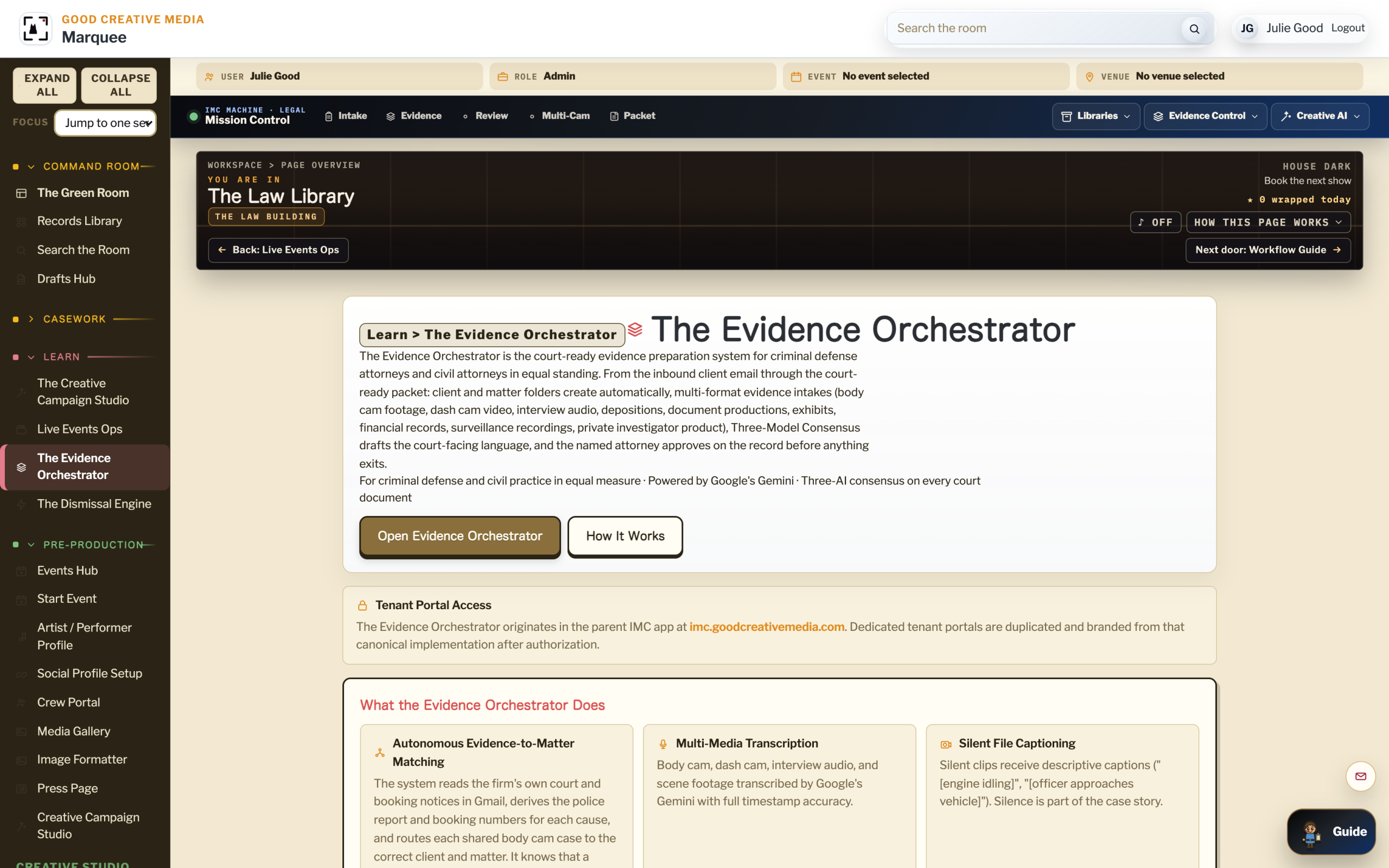
An instructional path for every law office that works with multi-format discovery. The Evidence Orchestrator turns hours of recorded video, audio, and document evidence into a navigable, court-ready index for criminal defense, personal injury, family, business, employment, and immigration practice alike. Five sequential modules cover the matter record, multi-format intake, the per-file workstation, the three-model consensus gate, and the native-file discovery posture.
The Evidence Orchestrator Inside The App. AI reads body cam, dash cam, interview audio, and surveillance.
Click To Enlarge ↗01 Course Syllabus
What You Will Be Able To Do.
Learning Objectives
By the end of this course, you will be able to:
- Bring a matter’s captured-incident video, audio, and documents into a single indexed workspace
- Work a file in the Cockpit with the AI Worksheet open beside it
- Run a court-bound passage through the three-model consensus gate before any attorney sees it
- Hold the Attorney Approval Ceremony as the publishing gate, not a checkbox
- Prepare a discovery production with the Article 39.14 (the Texas rule requiring the State to hand over its evidence to the defense)[1] native-file metadata posture intact
Pre-Requisites
A Matter And Some Discovery
You need an active workspace and at least one matter with captured-incident video, audio, or document production already attached. The course assumes basic criminal-defense practice familiarity.
Format
Sequential
The modules build on each other. Run them in order. Each is independent enough to revisit later as a reference.
Estimated Time
~75 Minutes
Five modules of 12 to 17 minutes each, including the hands-on review on real evidence. Print the syllabus for offline reading.
02 Audience Profiles
Who This Course Is For.
Criminal Defense Attorney
The signing attorney on a criminal matter. Reads all five modules; pays special attention to the defense-side callouts in Modules 01 and 05.
Personal Injury Attorney
Works dash-cam, scene video, surveillance, and deposition recordings. Reads Modules 01 through 04; Module 05 covers civil discovery production.
Family Law Attorney
Works custody recordings, financial discovery, and recorded interviews. The matter record holds the case across hearings and modifications.
Business / Commercial Litigator
Works deposition video, document productions at scale, and recorded board meetings. Modules 02 and 04 carry the most weight.
Employment Lawyer
Works HR interview recordings, workplace surveillance, and document discovery. Every matter starts with the same intake step.
Immigration Lawyer
Works recorded interviews, country-conditions evidence, and document portfolios. The Cockpit handles long-form recorded testimony.
Paralegal
Owns intake and indexing day to day, regardless of practice area. Focuses on Modules 01, 02, and 03.
Investigator
Brings additional recorded material into the matter, scene visits, witness interviews, surveillance. Focuses on Modules 01 and 02.
Law Firm Media Team
Operates the platform in-house under attorney supervision. Reads the full course. See Law Firm Media Teams.
03 The Five Modules
The Matter Record As Spine
Before a single file enters the workspace, the matter record has to hold the case. Every recorded interview, every produced document, every deposition video, every later action on the matter reads from it. This module sets the matter framing every law office shares, and the defense-side presumption framing that criminal practice adds on top.
In This Module
You Will Be Able To:
- Create a matter record with the canonical case-level facts in the right fields
- Distinguish a recorded-evidence file from a complaint, pleading, charging document, or claim form
- Apply defense-side terminology where it belongs in criminal matters
- Set the audit log so every later action on the matter is timestamped and attributed
Key Concepts
A matter is the case-level record. It carries the parties, the jurisdiction, the procedural posture, the relevant dates, and the responsible attorney. Every file downstream, an accident-scene dash-cam clip, a custody video, a deposition recording, a recorded HR interview, a body-camera production from evidence.com, is linked to the matter, not loose in a folder. The matter is what makes the work retrievable a year from now.
The Evidence Orchestrator’s field names and AI prompts are written so the same matter shape carries from a personal injury claim to a custody hearing to a criminal indictment. The differences are in the file types you attach and the procedural framing you apply.
Procedure
- Open the matter in the workspace and verify the parties block reads correctly, client, opposing party, court or tribunal, cause or claim number.
- Add the controlling document (complaint, indictment, demand letter, petition) as its own file type. It anchors the case theory; it is not itself evidence in chief.
- Link the recorded-evidence files to the matter directly. They are independent records of what the cameras, microphones, and producing parties captured.
- Confirm the matter audit log is on. Every later action, transcription, summary, redaction, export, will land here with a user and a timestamp.
Defense-Side Callout: The Presumption
For criminal matters, the parties block carries a vocabulary the law itself imposes. The complaining witness is “the complainant,” not “the victim,” until a jury says otherwise. Your client is “the defendant,” not “the accused” or “the offender.” A captured incident is a captured incident, the recording shows what the camera was pointed at, no more, not an arrest, not a confession. The Orchestrator’s criminal-matter templates enforce that vocabulary at the field level. See the founder’s note on the AP / Marshall Project[3] / Prison Journalism Project[4] standards on the Founder page.
Try It Now
Open one matter and read the parties block aloud. Confirm every named role reads the way the procedure expects it to: claimant and respondent, petitioner and respondent, plaintiff and defendant, or, in criminal practice, the defendant and the complainant. The job for the next four modules is easier when the record speaks the law’s own grammar.
Check Your Understanding
How many separate places in your current system does the same matter live, a case management tool, a folder on a server, a spreadsheet, an email thread? What would change about the work if every file on the matter read from one record?
Industry Framing
Every law office runs the same five-module workflow against its own discovery. See the practice-area pages: Law Firms, Personal Injury, Family Law, Business Litigation, Employment Law, Immigration Law, Indigent Criminal Defense, and Private Investigators.
Intake From Many Sources, One Index
Discovery never arrives on one drive. A criminal defense file pulls an Axon evidence.com production, a stack of prosecutor PDFs, a phone backup from the client, and a folder of body-camera clips. A personal injury file pulls scene photos, dash-cam footage, traffic-cam video, deposition recordings, and medical records. A family law file pulls custody recordings, financial discovery, and recorded interviews. A business litigation file pulls deposition video, document productions at email-archive scale, and recorded board meetings. The intake module pulls every one of those into the same indexed, transcribed, and captioned workspace, including the files that are silent.

Capture Cockpit Intake. Body cam, dash cam, interview audio, surveillance, CCTV all route to one matter folder.
Click To Enlarge ↗In This Module
You Will Be Able To:
- Route a producing party’s discovery into the matter without exporting twice
- Bring document, audio, and video evidence into the same index across practice areas
- Add a descriptive caption to a silent clip so the silence itself becomes part of the case story
Key Concepts
A firm that re-types a deposition video’s contents is paying for the same minute twice, once to watch it and once to write it down. The Evidence Orchestrator runs Google’s Gemini against every recorded file at intake and produces a synchronized transcript and a caption track. The result is a file you can read, search, and jump into in seconds.
Silent passages matter as much as loud ones. A four-minute clip of an engine idling outside a residence in a criminal matter. A two-minute clip of an empty doorway from a personal injury surveillance reel. A long pause in a recorded HR interview. The platform captions each with a descriptive line, “[engine idling],” “[no movement in frame],” “[interview paused, off mic]” so the team can count the silence the same way it counts the speech.
Procedure
- Open Multi-Format Evidence Intake on the matter and choose the file types you are loading.
- For Axon evidence.com productions in criminal matters, use The Axon Download Orchestration Lane to bring the full production in with cryptographic integrity intact.
- For documents, drag the PDFs in directly, pleadings, productions, medical records, financial statements, contracts, exhibits. The platform indexes the text and runs an OCR pass on scanned pages.
- For audio and video, transcription runs automatically using Google’s Gemini. Captions for silent passages are inserted descriptively.
- Confirm every file shows up on the matter index with a transcript, a caption track, and a duration.
Try It Now
Pick one matter with at least three recorded files of different lengths, depositions, dash-cam, body-cam, surveillance, interview audio, whatever the matter holds. Run the intake. Open the index and look at the speech-versus-silence split. Does it match what the case theory expects? Knowing that now is more useful than learning it the night before a hearing.
Check Your Understanding
In a recent matter, how many hours of recorded discovery did the paralegal watch in real time to write a summary? What did that hourly cost work out to per minute of usable summary?
Instructor Note
Transcription uses Google’s Gemini at the platform’s pinned Pro tier. The public copy on the site says “Google’s Gemini” without a version number on purpose, you are buying a posture, not a particular release. The version we run on is documented internally and is upgraded in a controlled run, not silently.
The Cockpit And The AI Worksheet
Reviewing evidence is reading. The Cockpit is the per-file workstation where the reading actually happens: video on the left, transcript on the right, captions running, AI Worksheet open below. Five synchronized gauges, time, speakers, motion, audio level, AI confidence, orient the reader. This module covers working a single body-cam clip from open to closed.
The Video Capture Cockpit. AI transcripts, captioned silences, and filterable timestamps from every MP4.
Click To Enlarge ↗In This Module
You Will Be Able To:
- Open a file in the Cockpit and orient yourself with the five gauges
- Work through the AI Worksheet’s structured questions for the file
- Surface a Recommended Clip for attorney review without watching the whole clip first
Key Concepts
An hour-long recording is rarely an hour of information. A body-cam clip is forty minutes of driving, eight minutes of waiting, ten minutes of conversation that matters, and two minutes that decide the case. A deposition is six hours of testimony, ninety minutes of which goes to the cross. A custody video is forty-five minutes, three of which a court will care about. The Cockpit is built to find those critical minutes faster than human eyes alone can.
The AI Worksheet is structured: numbered questions, the same shape for every file of the same type, the same shape for every matter in your practice. The questions are pre-loaded for body-cam, dash-cam, deposition, recorded interview, jail call, surveillance video, custody recording, and document discovery. The answers are not the work, the answers prompt the attorney’s reading.
Procedure
- From the matter index, open one recorded file. The Cockpit loads with the video on the left, transcript on the right, and the AI Worksheet at the bottom.
- Read the five gauges before you press play. They tell you where the busy minutes are.
- Use the Worksheet’s numbered questions as the reading order. Each answer hyperlinks back into the transcript at the exact second the answer comes from.
- For passages worth showing the attorney, mark a Recommended Clip with a one-line note.
- Close the file. The Worksheet, the clip queue, and the audit-log entry are saved to the matter automatically.
Try It Now
Open one recorded file you have already reviewed once, a deposition video, a body-cam clip, a recorded interview, whichever you have. Work through the AI Worksheet for it. Note the questions you did not think to ask the first time. Those questions are the value the Cockpit adds, consistent reading across every file the practice handles.
Check Your Understanding
If the same set of structured questions ran against every body-cam clip in every matter you handled this year, what patterns would surface that you cannot see today, one file at a time?
Related Reading
Background on the Cockpit’s instrumentation lives at The Cockpit. The Worksheet’s question taxonomy is documented at The AI Worksheet Panel.
The Three-Model Consensus Gate
A passage on its way to a motion, a brief, or a packet is not the work of one model. It passes through OpenAI’s ChatGPT, Anthropic’s Claude, and Google’s Gemini in concert. Two of three must agree on the factual claims; disagreements are surfaced for the attorney to resolve. Then the Attorney Approval Ceremony holds the publishing gate. This module covers running a passage through that gate end to end.
In This Module
You Will Be Able To:
- Route a draft passage through the three-model consensus gate
- Read the disagreement report and choose between the models
- Hold the Attorney Approval Ceremony as the publishing step, not a checkbox
Key Concepts
Single-model AI output is not defensible for court-bound work. Any one model can hallucinate, misread a date, or invent a citation. The three-model consensus gate exists because two-of-three agreement on a factual claim is meaningfully harder to fake than one-model assertion. The disagreement itself is informative, if two models say one thing and one model says another, that one model’s objection is the start of the review.
The Attorney Approval Ceremony is the moment the attorney signs off, in the platform, with an audit trail. Nothing files automatically. Nothing leaves the platform without that signature. The ceremony is two clicks; the meaning is everything.
Procedure
- From the matter, select the draft passage. Send it to The Three-Model Consensus Gate.
- Wait for all three models to return. Open the disagreement report.
- For each disagreement, read the dissenting model’s reasoning before reading the consensus. Mark each disagreement as resolved, flagged, or escalated.
- Once the passage clears the gate, open the Attorney Approval Ceremony. Read the final passage with the matter context loaded.
- Sign. The platform writes the approval to the audit log with the attorney’s identity, the timestamp, and the matter ID.
Try It Now
Pick a paragraph from a draft motion. Run it through the consensus gate. Read what the three models disagreed on. Even if you agree with the consensus, the disagreement is the lesson, that is the place a human reader was about to overlook something.
Check Your Understanding
In your current workflow, how do you defend an AI-assisted paragraph in a motion if opposing counsel asks how it was generated? What does an audit-logged, three-model, attorney-signed ceremony do to that conversation?
Instructor Note
Court-bound deliverables, motions, briefs, dismissal packets, are required to pass through the consensus gate. Internal work product, client memos, investigation notes, does not require the gate, but the option is available. The platform records which path each document took.
Discovery Production With Native-File Metadata Intact
Every law office produces discovery. The procedural rule changes, Texas Article 39.14 in criminal practice, Federal Rules of Civil Procedure 26 and 34 in federal civil litigation, state analogs in state civil practice, but the platform’s default export posture stays the same: native-file metadata preserved, hashes recorded, chain-of-custody logged. This module covers preparing a production, exporting it, and documenting the chain.
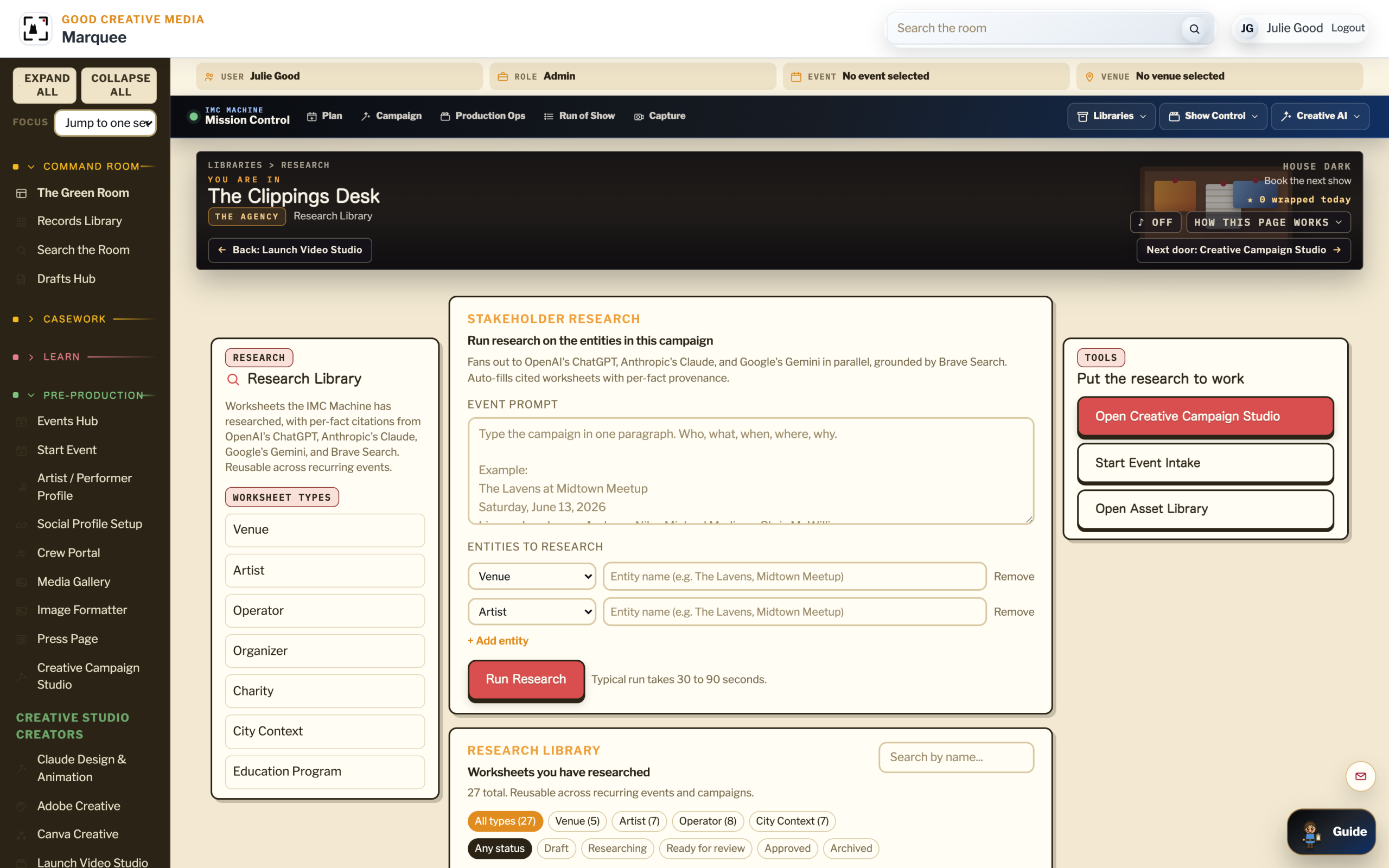
Investigative Research Surface. Research that supports motion practice. Citation checking and three-model consensus on findings.
Click To Enlarge ↗In This Module
You Will Be Able To:
- Assemble a discovery export with native-file metadata preserved
- Generate the matter’s production index in a court-ready format
- Document the chain-of-custody record the platform writes alongside the export
Key Concepts
The platform’s posture is that recorded-evidence files produced in discovery should arrive in their native container, with the metadata the producing party originally captured still attached, not flattened into a downloaded MP4 with a fresh creation date and a stripped EXIF block. The attorney still makes every discovery decision in the actual case; the platform handles the file fidelity so the decision is the only judgment call.
The chain-of-custody record the platform writes is not a substitute for the attorney’s sworn certification. It is the supporting log: who pulled the file, when, what hash, what export format. The attorney signs the document; the log documents the work that backed the signature.
Procedure
- Open The Native-File Metadata Posture from the matter export menu.
- Select the files in the production set. Verify that every selected file shows the “native metadata intact” flag.
- Generate the production index. It includes file names, hashes, durations, captured device IDs where available, and the matter’s chain-of-custody log.
- Export. The package is downloadable as a single archive or as individual files plus the index.
- Attach the matter’s audit log entry for the export to the file you store on the firm side.
Defense-Side Callout: Article 39.14
For criminal defense practice in Texas, the controlling statute is Article 39.14 of the Code of Criminal Procedure. The platform’s native-file posture is built around what that statute calls for: discoverable items produced as the producing party held them, not as derivative downloads with fresh metadata. The same posture serves civil practice under FRCP 26[2] and 34, and the state-level civil analogs, because the underlying engineering does not change.
Try It Now
Take one matter that has at least three recorded-evidence files. Prepare a mock production export. Open the index. Verify the hashes match the files. That five-minute check is what a chain-of-custody challenge in front of a judge actually looks like.
Check Your Understanding
If the production you sent out last quarter was challenged today on chain-of-custody grounds, what could you show the judge in under five minutes? What would you wish you had?
Cross-Reference
For criminal-defense practice, The Evidence Orchestrator hands off to The Issue Spotter for motion drafting. For civil practice, the Orchestrator’s output goes into the firm’s existing case-management and trial-prep workflow, the platform stays in the evidence layer.
04 Practice-Area Applications
The Same Five Modules,Across Every Law Office.
The Evidence Orchestrator’s workflow is identical from practice area to practice area. The files change. The procedure changes. The vocabulary in the matter record changes. The five modules above, matter, intake, Cockpit, consensus gate, native-file production, do not.
Personal Injury
Dash-cam, scene video, traffic-camera footage, surveillance, medical records, deposition recordings, recorded statements from witnesses. Module 02 runs at scale; Modules 03 and 04 prep the demand letter and the trial exhibits.
Family Law
Custody recordings, financial discovery, recorded interviews, text-message productions, social-media exports. The matter record holds the case across hearings, modifications, and post-decree work for the life of the file.
Business Litigation
Deposition video at scale, document productions in the millions of pages, recorded board meetings, expert recordings. Modules 02 and 04 carry the heaviest weight; the consensus gate matters most when the brief is going to a federal judge.
Business Entities & Transactional
Recorded negotiations, due-diligence document portfolios, recorded board approvals, contract executions. The platform handles the recordkeeping a transaction-heavy firm needs for the audit window.
Employment Law
HR interview recordings, workplace surveillance, recorded grievance proceedings, document discovery from internal investigations. Every matter starts with the same intake step and ends with the same chain-of-custody log.
Immigration Law
Recorded client interviews, country-conditions evidence, document portfolios, recorded hearings. The Cockpit handles long-form recorded testimony; the platform’s captioning serves the multilingual practice this work requires.
Entertainment Law
Music licensing chain of title, film and TV distribution records, talent and recording agreements, NDAs, business entities for entertainment companies, royalty audits and disputes. Recorded negotiations indexed and searchable.
Sports Law
Athlete representation, NIL deals, endorsement records, recorded negotiations, broadcast and team film, recorded depositions in concussion litigation. The career record and the matter record live on the same workspace.
Media Law
Social, newsroom, internet, AI-generated content, voice cloning, synthetic media. Recorded source interviews, prompt logs, draft versions, deposition video. Pre-publication review and litigation on the same record.
Indigent Criminal Defense
Axon evidence.com productions, body-cam, dash-cam, jail calls, charging documents. The platform’s defense-side callouts run automatically in criminal matters. See the modules above for the full criminal workflow.
Law Firms (Umbrella)
For firms with mixed practice or general civil work. The platform’s matter shape carries from one practice area to another inside the same firm without re-tooling.
Private Investigators
Surveillance video, interview audio, scene photos, background reports. Investigators work the Orchestrator alongside the attorney they support, the matter holds the work on the firm side, the investigator’s contributions land on the same record.
05 Glossary
Key Terms For This Course.
- Matter
- The case-level record in the workspace. Anchors every file, transcript, worksheet, motion draft, and audit-log entry.
- Captured Incident
- A recording of what a camera or microphone picked up. Used in place of “arrest” or “crime” until a jury has spoken.
- The Complainant
- The person reporting a complaint. Used in place of “victim” pre-conviction.
- The Defendant
- The accused person. Used in place of “offender” or “perpetrator.”
- The Cockpit
- The per-file workstation with five synchronized gauges. See The Cockpit.
- AI Worksheet
- Structured numbered questions per file type, with answers hyperlinked back into the source transcript. See The AI Worksheet Panel.
- Recommended Clip
- A passage flagged by reviewer or AI as worth attorney attention, with a one-line note. See Recommended Clips.
- Axon Orchestration
- The download lane that pulls evidence.com productions into the matter with cryptographic integrity. See Axon Download Orchestration.
- Three-Model Consensus
- OpenAI’s ChatGPT, Anthropic’s Claude, and Google’s Gemini in concert. Two-of-three agreement is the floor for court-bound passages. See The Three-Model Consensus Gate.
- Attorney Approval Ceremony
- The signed publishing step. Nothing leaves the platform without it. See The Attorney Approval Ceremony.
- Article 39.14 Posture
- The platform’s default export behavior: native-file metadata preserved, hashes recorded, chain-of-custody logged. See The Article 39.14 Native-File Metadata Posture.
- Cross-Domain Coordination
- The model that lets the marketing side of the firm and the evidence side share the same audit-logged platform without bleeding into each other. See Cross-Domain Coordination.
06 Further Learning
Continue The Path.
Next Course
The Issue Spotter
Where the evidence becomes the motion. Move from indexed file to dismissal pathway with the same audit log and the same attorney signature.
Course Overview
All Learning Paths
The full Learn library for The IMC Machine, with brief descriptions of all four product courses.
Product Page
The Evidence Orchestrator Overview
The product page for the Orchestrator, what it does, who it serves, and how it fits inside The IMC Machine.
Reference
The Controlled Benchmark Matter
The anonymized reference matter the platform is tested against. Use it to see the workflow end to end before you load real discovery.
Industry Page
Law Firms (Umbrella)
Every law office runs marketing, intake, evidence, and discovery preparation on one platform. The umbrella page for firms with mixed or general practice.
Industry Page
Personal Injury Firms
Scene video, dash-cam, deposition recordings, and medical records on one indexed matter. The demand letter and the trial exhibits ship from the same record.
Industry Page
Family Law Firms
Custody recordings, financial discovery, recorded interviews. The matter holds the case across hearings, modifications, and post-decree work.
Industry Page
Business Litigation
Deposition video at scale, document productions, recorded board meetings. The consensus gate carries weight when the brief is federal.
Industry Page
Business Entities & Transactional
Recorded negotiations, due-diligence portfolios, recorded board approvals. The platform handles the recordkeeping a transaction-heavy firm needs.
Industry Page
Employment Law Firms
HR interview recordings, workplace surveillance, grievance proceedings, internal investigations. Same intake, same chain-of-custody log.
Industry Page
Immigration Law Firms
Recorded client interviews, country-conditions evidence, recorded hearings, document portfolios. Captioning serves the multilingual practice.
Industry Page
Indigent Criminal Defense
How the Orchestrator shows up for appointed-counsel work. Built for the case the system would otherwise underweight.
Industry Page
Private Investigators
Surveillance video, interview audio, scene photos, and background reports. The investigator’s side of the same matter the attorney works.
In-App
Open The Orchestrator
Skip the course and open the working surface. Come back to the modules when you have a real file open.
07 Sources And Citations
Where Every Quote, Statute, And Citation On This Page Comes From.
Every numbered citation in the page above links to its source below. Statutes link to the official codified text. Cases link to public, freely accessible legal databases. Style guides link to the publishers’ canonical pages.
- Texas Code of Criminal Procedure, Article 39.14. Discovery. The Texas defense-side discovery statute, including the Michael Morton Act amendments. statutes.capitol.texas.gov / CR.39.14
- Federal Rules of Civil Procedure, Rule 26. Duty to Disclose; General Provisions Governing Discovery. Cornell Law School Legal Information Institute. law.cornell.edu / rules / frcp / rule_26
- The Marshall Project Language Project. A working style guide for criminal justice reporting, including people-first language standards and recommended terminology for journalists covering the criminal legal system. themarshallproject.org / language-project
- Prison Journalism Project Style Guide. Editorial standards for reporting on incarceration and the criminal legal system, with people-first language guidance authored by incarcerated and formerly incarcerated journalists. prisonjournalismproject.org / about-us
- Federal Rules of Civil Procedure, Rule 34. Producing Documents, Electronically Stored Information, and Tangible Things. Cornell Law School Legal Information Institute. law.cornell.edu / rules / frcp / rule_34
- Brady v. Maryland, 373 U.S. 83 (1963). United States Supreme Court. The constitutional foundation for prosecution disclosure of exculpatory evidence. Justia. supreme.justia.com / cases / federal / 373 / 83
- Giglio v. United States, 405 U.S. 150 (1972). United States Supreme Court. The constitutional foundation for prosecution disclosure of impeachment material against state witnesses. Justia. supreme.justia.com / cases / federal / 405 / 150
Sources are listed in citation order. Statutory and case law citations are current as of May 23, 2026. The most recent enacted version of any statute supersedes prior versions. None of this page is legal advice. The named lawyer on any matter bears the final responsibility for the discovery posture, the motion practice, and the citations to authority in any filed document under the applicable state or federal rules.
Ready To Work A Real Matter?
Create an account to open The Evidence Orchestrator, or book a walkthrough and we will work the platform with you on a benchmark matter before any client file is loaded.
Buy The Evidence Orchestrator
The Whole Evidence Lane, From Subscription To Per-Matter Pilot.
From a single-matter pilot at $750 to per-attorney firm subscriptions. Plus the integrations, onboarding, and three-AI quorum reviews that make it work.



Photo Gallery
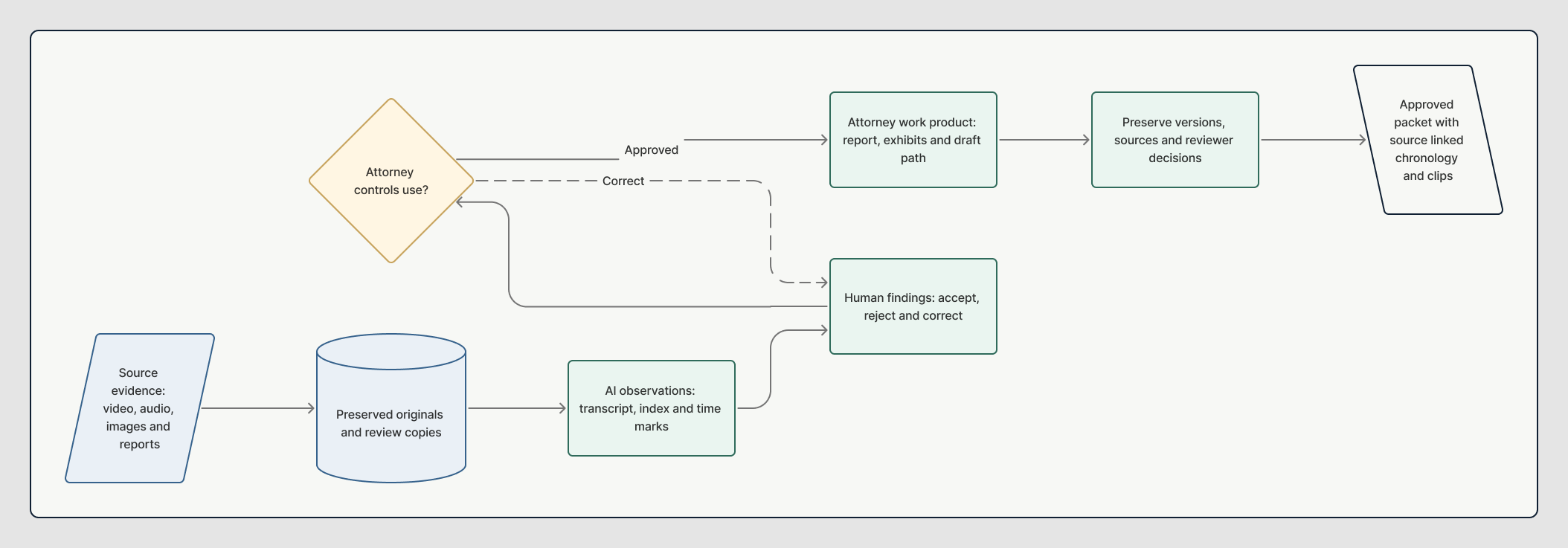
Visual Workflow
Evidence Orchestrator from source to approved outcome.
Follow the practical movement of the work. The machine organizes, drafts, compares, and prepares. The responsible person keeps authority over approval and release.