

Build a campaign from a flyer or an idea
Start with your source, then keep the facts, copy, photographs and finished files together on one saved press sheet. Work across theater, music, venues, services and property campaigns without choosing one permanent industry identity.
Add your source
Upload an image, PDF or text file up to 6 MiB, or describe your idea. Analysis requires a connected creative service or an authorized creative operator. If that connection, sign-in or plan capacity is unavailable, the request stays saved and unfinished when you leave the page.
Review the facts and copy
Check names, dates, venue and the action you want readers to take. Unknown admission, policies and contacts stay unresolved. Review one specific occurrence; a recurring-series title does not confirm every date.
Use relevant client photography
Reuse a matching saved profile’s approved photo library. Review permission and subject identity. Add a photographic correction if needed, retain the original, and identify a community photograph when the scheduled performer is not pictured.
Review the complete press sheet
Inspect the actual copy, each graphic, selected film and downloads. Check readable dates, protected faces, captions and sound where selected. A saved request or source image is not a finished export. Resume a saved composition after a service hold.
Approve the exact destinations
Approval binds the current copy, assets and selected destination accounts. Editing the package requires renewed approval. Distribution remains held until the required connection, review and channel checks pass; only an actual receipt establishes delivery.
Review-link visibility: saving a press sheet creates a publicly readable review URL before distribution approval. Uploaded source documents and retained source-file snapshots stay in private storage; a website photograph may already be public at its original source. Check the public copy before saving.
Built on Julie Good’s original campaign-management system. Availability follows your account’s actual access and connected services. Existing app subscriptions and separately billed APIs have distinct limits.IMC workspace guide · October 24, 2026
Navigation and profile workflow update
Start with a task. Keep your work connected.
After signing in, your workspace brings the tools included with your account together as cards. Search for a task, continue a saved campaign, or move between your authorized studios. Use All workspaces to return.
A theater producer, musician and real-estate professional can use the same account across the studios they are authorized to access. Each saved profile, property and campaign retains its own ownership and project context.
Open your IMC workspace · Sign in · Current product catalog
Campaigns & creative
Press releases, social copy, graphics and film from one brief.
People & places
Saved profiles, photographs, brand details and menu notes.
Live events & performances
Plan performances, link participants and prepare promotion.
Media & recording
Photographs, video, audio capture and podcasts.
Review & distribution
Review campaigns, channel drafts and delivery receipts.
Properties & real estate
Listings, property media, maintenance and transactions.
Evidence & case records
Authorized matters, source files, transcripts and reports.
Legal issues & motions
Source-linked issues, motion preparation and attorney review.
Learning & account
Instructions, account settings and support.
Venue, menu, photographs and performance
- Open People & places → Venues & businesses. Choose the workspace and save the venue’s confirmed facts.
- Under Online Shops and Menus, maintain the menu URL and menu/food-promotion notes. Upload a profile image, or review website media and usage rights in the brand library.
- Open the saved profile’s campaign strategy. Menu notes enter the brief for review; confirm current prices, availability and rights before production.
- Use Live events & performances to plan a band performance or theater event. Keep venue and participant records linked to the relevant project.
Saved press sheets have publicly readable review links, including before approval. Approval controls distribution, not review-link visibility. Menu notes do not publish a menu or update an ordering system. Generated copy and media still need fact, rights and quality review. Availability depends on subscription access, connected services and worker readiness. Publication and purchase actions have separate checks.
The original campaign-management and business communications system was designed and authored by Julie Good. This guide describes its current IMC navigation.
How It Works
One event. One source record. Many useful outcomes.
The IMC Machine begins with the real work and preserves the record that work creates. It connects preparation, operation, capture, human review, publication, delivery, and proof across media, live events, business, education, property, law, and family history.
Book it. Build it. Sell it. Run it. Capture it. Share it.
IMC Machine · Video Series
See the Work Move.
An operating system can sound abstract until you watch the work move. Begin with the thirty-second introduction, continue through the complete platform, then preview the Classroom Edition now taking shape.
Strategic Communication and Innovation Designed by Julie Good, MATC · Good Creative Media · San Antonio, Texas
Start Here
Live Event Management Software: What Is IMC Machine?
Begin here. In under a minute, see why one verified record should carry the facts, approvals, media, and useful work that surround a live event.
Watch on YouTubeComplete Platform Overview
How IMC Machine Works: Event Marketing, Production, and Operations
Follow the complete route from approved facts through campaign work, live production, organizational operations, specialized domains, human review, and a durable archive.
Watch on YouTubeClassroom Edition · In Development
Project-Based Learning Software: IMC Machine Classroom Edition Preview
A careful preview of a project-based learning vertical designed to connect research, sources, teamwork, production, review, reflection, and presentation. In development; not yet open.
Watch on YouTubeThe Platform
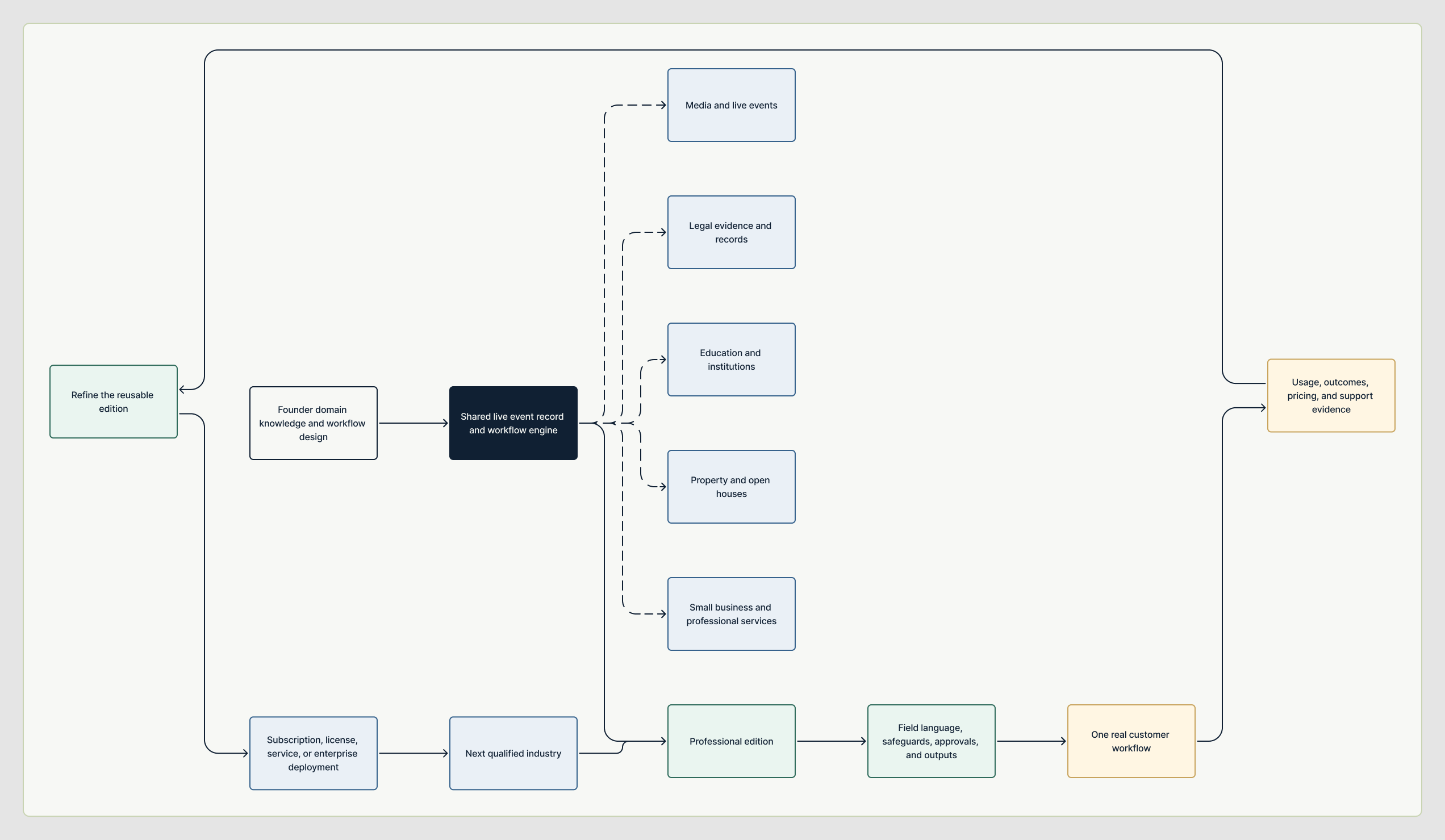
The event happens once. The record keeps working.
Professional capability should not depend on enterprise scale. AI enlarges human capacity. It does not replace human authorship, responsibility, or approval.



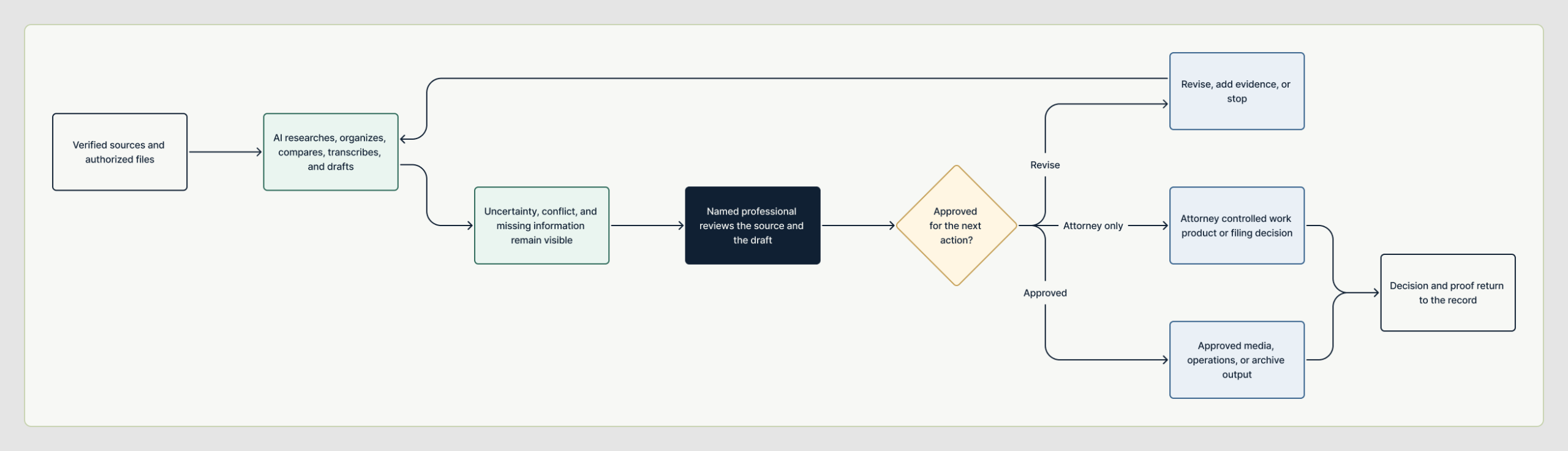
Create and Publish
One shared discipline, expressed in the language of the work.



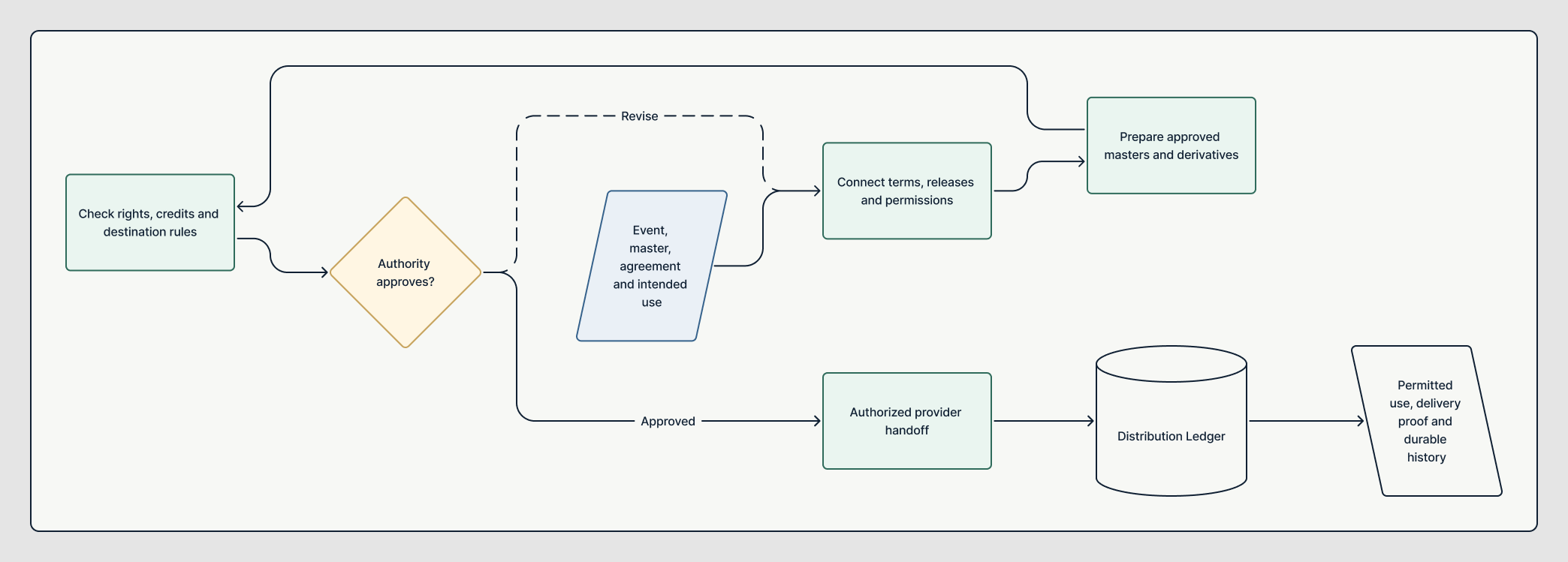
Produce and Operate
One shared discipline, expressed in the language of the work.





Run the Organization
One shared discipline, expressed in the language of the work.




Professional Editions
One shared discipline, expressed in the language of the work.

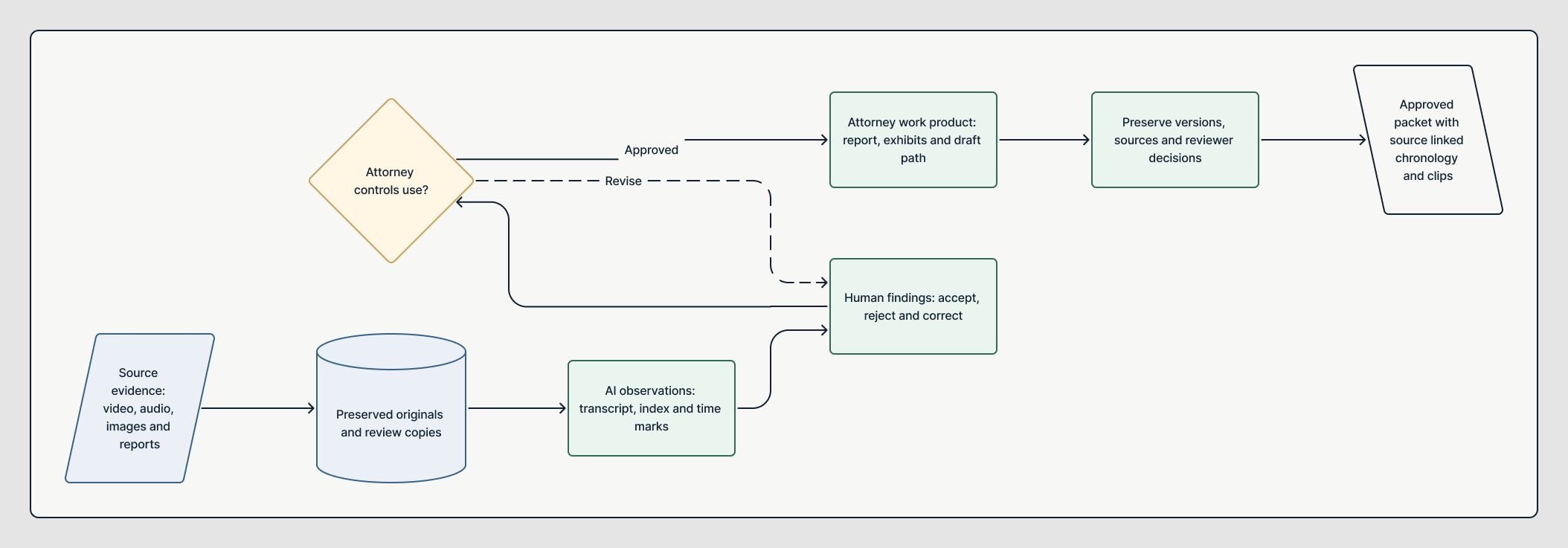




Read. Compare. Decide.
The website should do the explaining.
Review the current application, the complete workflows, the useful outputs, the maturity boundaries, and the governing human decisions. Request a secure account only when direct access is useful.
Book it. Build it. Sell it. Run it. Capture it. Share it.
